Exxon Mobil Rewards+
- 3.6
- Rating
- 1.00M
- Installs
- Free
- Price
 Analysis by App-foxy
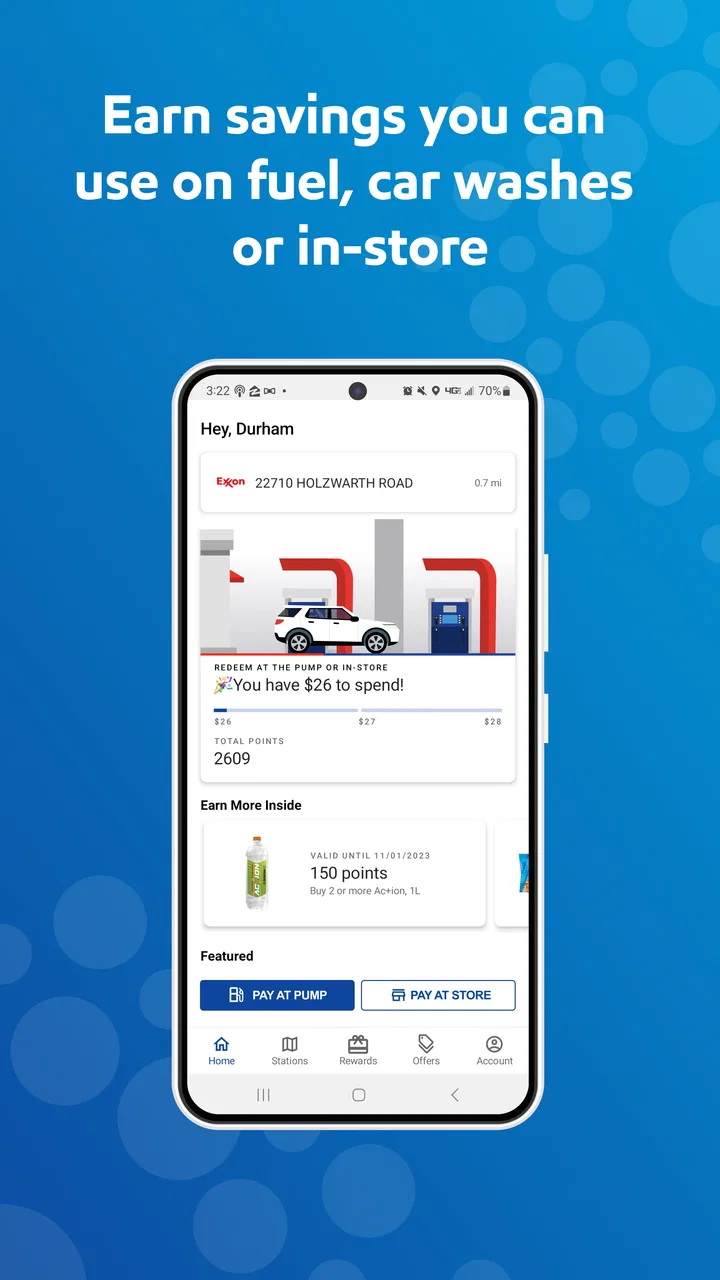
I installed Exxon Mobil Rewards+ to see how well it handles a very ordinary problem: finding a suitable Exxon or Mobil fuel stop, paying attention to rewards, and getting back on the road without turning a quick refuel into a complicated task. It is a free Maps & Navigation app from ExxonMobil, aimed mainly at drivers who regularly use those stations rather than people looking for a universal fuel directory.
That focus is both its main strength and its first limitation. When my journey already involved an Exxon or Mobil location, the app felt more useful than a general map because the fuel stop and loyalty side of the visit were connected. When I simply wanted the cheapest fuel from every nearby brand, a broader navigation or price-comparison tool made more sense. The app has reached over a million installs and holds a 3.7 average from roughly thirty-four thousand ratings, so it clearly serves a sizable audience, although the score also suggests that the experience is not equally smooth for everyone.
From an empty tank to a completed fuel stop
I approach a fuel stop as a short chain of decisions, and this section follows that chain from noticing the tank is low to finishing the visit. The useful trick is to make the station choice while parked and with enough time to compare its route fit, rather than letting urgency decide for me. That preparation also sets up a closer look at what to expect when opening the app.
You May Also Like

 Blood Strike: 2.5 Anniversary
Blood Strike’s Loadouts Turn Every Drop Into a Tactical Gamble
A close look at Blood Strike’s custom loadouts: how fast access to signature weapons reshapes its battle royale rhythm, rewards preparation, and narrows the gap between fights.

 Pandora - Music & Podcasts
Pandora’s Music Is Easy to Start, but Harder to Recover
Pandora’s strength is its low-effort path from a seed to a station. Its weak spot is how much confidence it asks you to place in connection, setup, and quiet recovery.

 8 Ball Pool
 Is Built on Rivalries, Rematches, and Routine
A close look at the rivalries, rematches, shared routines, and unanswered safety questions that turn a quick pool match into a persistent mobile community.

 Samsung Music
’s Quiet Strength Is Playing What You Already Own
Its reach comes less from spectacle than from dependable access to a personal library. That simplicity is both the app’s strongest retention engine and its ceiling.

 AccuWeather: Weather Radar
AccuWeather Review: A Quick, Clear Forecast for Everyday Decisions
For everyday plans, the best forecast is the one you can understand quickly. AccuWeather makes rain timing, radar, and local conditions easy to act on, with a few trade-offs.

 Hill Climb Racing
Why Hill Climb Racing Still Turns Crashes Into One More Run
A tiny car, a bumpy hill and one more upgrade: Hill Climb Racing keeps resurfacing because its simple chaos makes every near-miss feel personal.
More From Our News Desk



Starting with the right expectation
The first thing I would tell a friend is to treat this as a brand-specific driving companion, not as a replacement for a full navigation suite. ExxonMobil is the developer, and the app’s purpose is closely tied to Exxon and Mobil stations, fuel purchases, and rewards points. That makes the starting condition important: it is most worthwhile when you already prefer these stations or want to manage activity connected with them.
If I were planning a long drive, I would not rely on it alone for every part of the route. I would use a familiar navigation app to understand the whole journey, then use Exxon Mobil Rewards+ when I needed to identify a relevant station or handle the rewards part of the stop. This division of labor avoids expecting a fuel loyalty app to provide the depth of a dedicated route planner.
The app is free, which removes the main barrier to trying it. Its content rating is Everyone, so it is positioned as a general-purpose utility rather than an age-restricted service. It first appeared on July 30, 2013, and the current version is 6.3.0, showing that this is an established app rather than a newly released experiment.
Setting up before the urgent moment
My practical advice is to install and explore it before the fuel warning appears. A driver with very little fuel left has no patience for account screens, sign-in steps, or uncertainty about whether a station is supported. Doing the initial setup at home gives you time to understand where station search, rewards information, and payment-related actions sit in the interface.
This is one of the less obvious lessons with apps like this: the valuable minutes are saved before the journey, not necessarily at the pump. I would open the app while planning a trip, check how nearby stations are presented, and make sure I understood the path from selecting a location to completing a purchase. That preparation also makes it easier to notice whether a particular stop fits the route rather than assuming the nearest branded station is automatically convenient.
I would also keep a normal payment method available. A dedicated fuel app can make a stop more organized, but it should not be treated as the only thing standing between you and a full tank. If the app takes longer than expected to load or the station experience differs from what you anticipated, a backup card or standard payment option prevents a small technical issue from becoming a roadside problem.
Finding a station without losing the journey
Once I know I want an Exxon or Mobil stop, the app’s station-finding role becomes more relevant. I would use it to narrow the search to the brand locations that make sense for my direction of travel, then judge the result using ordinary driving logic: Is it close to the route? Will leaving and rejoining the road be easy? Is there enough room in the schedule for a stop there?
This sounds simple, but it is where a brand-focused service differs from a general map. A broad map may show more brands and may be better for overall route planning. Exxon Mobil Rewards+ has a more specific purpose: helping a driver connect a branded fuel visit with the rewards experience. The trade-off is useful focus versus wider coverage.
For a daily commuter, I would search once before leaving and become familiar with the stations along the regular route. For a road trip, I would check several possible stops rather than waiting until the last moment. A station that looks ideal on a map may be inconvenient if it requires a detour, and the app cannot remove that real-world trade-off.
Turning the stop into a repeatable routine
My preferred workflow would be consistent: choose the station before pulling in, arrive with the app already understood, complete the fuel visit, and then check that the rewards side of the transaction has been handled. The point is not to stare at the phone while standing beside the pump. The point is to reduce decisions during the stop.
That routine is especially useful for people who refuel frequently for work, family travel, or regular commuting. Instead of treating every visit as a separate search, the app can become a small checklist: locate the suitable station, use the available rewards process, and confirm the outcome afterward. The more often you use the same brand, the more this focused workflow can justify keeping a dedicated app installed.
I would avoid operating the app while driving. Even a simple station lookup is a distraction when the vehicle is moving. The sensible handoff is from driver to passenger, or from planning before departure to execution after parking. That may sound obvious, but it is an important difference between an app that supports a journey and one that creates another source of attention demand.
The rewards handoff is where value is created
The central handoff is between the physical fuel purchase and the digital rewards account. A successful visit is not only about reaching the station; it is about making sure the app recognizes the activity in the way you expect. I would check the rewards area after a purchase rather than assuming that every step completed automatically.
This is a useful habit because loyalty systems are easy to misunderstand. A driver may remember choosing a station but forget whether the rewards action was actually completed. Checking the result soon after the stop makes errors easier to notice while the details are still fresh. It also prevents a month of fuel visits from becoming one large mystery at the end.
I would not make a purchase decision based only on points. Fuel price, distance, route convenience, and time still matter. If another station is substantially easier to reach or better suited to the trip, rewards should be considered alongside those factors rather than treated as a reason to create an unnecessary detour. The app helps organize the loyalty side; it does not make every branded stop the best economic or practical choice.
A realistic weekday scenario
Imagine I am leaving work with a low tank and a child waiting at home. I open the app while still parked, look for a suitable Exxon or Mobil station along my route, and choose one that does not force me across busy roads or away from the main trip. Because I explored the app earlier, I am not learning the interface under pressure.
At the station, I complete the fuel stop and use the rewards workflow rather than treating the app as a map that can be closed immediately. Once I am safely parked or back home, I check the account activity. If everything appears correctly, the process ends with a clear record instead of a vague memory of whether I used the program.
The outcome is modest but useful: one less decision during a rushed commute, a station choice connected to the route, and a better chance of keeping fuel activity organized. The app does not transform refueling, but it can make repeated visits more deliberate. That is a realistic benefit and, in my view, a better reason to use it than expecting dramatic savings from every stop.
What happens when the handoff fails
The weakest part of this type of workflow is the boundary between the app, the station, the pump, and the account. A digital action may feel complete on the phone while the physical transaction follows a slightly different path. If the rewards record does not appear as expected, I would first check the account and transaction details, then keep the receipt or other purchase information until the issue is resolved.
I would also avoid repeatedly tapping through a payment or rewards screen simply because the first response seems slow. Duplicate attempts can create confusion, especially when a physical pump is involved. Pausing, checking the station instructions, and using the ordinary payment fallback is safer than assuming that more taps will fix the problem.
Connectivity is another practical pressure point. A station may have weak reception, or the phone may be busy switching between networks. For that reason, I would plan the location before arriving and avoid making the entire fuel stop depend on a last-second search. The app is more dependable as part of a prepared routine than as an emergency tool used with an almost empty tank.
How it compares with ordinary alternatives
A general navigation app remains the better choice when the main question is, “What is the fastest route?” or “Which fuel brands are available everywhere along this journey?” Those services usually have a broader view of roads, destinations, and competing locations. They are also more natural for a driver who does not consistently use Exxon or Mobil.
A station’s own app, however, can be more useful than a general map when the driver cares about the complete branded visit. The advantage here is the connection between finding a relevant station and managing Exxon Mobil fuel rewards. That specialization is the reason to keep it, while the narrower brand scope is the reason not to make it your only navigation tool.
For someone who changes fuel brands based on price, the app may feel restrictive. I would compare the station’s convenience and current cost with alternatives before changing my route for rewards alone. For a loyal customer who already stops at Exxon or Mobil, the same limitation is less serious because the app is supporting an existing habit rather than trying to dictate every fuel decision.
Who will get the most from it
I think the best fit is a regular Exxon or Mobil customer who wants a single place for station-oriented planning and fuel rewards. It also suits drivers who prefer to prepare a stop before leaving, rather than searching from scratch each time. Frequent users can benefit more than occasional users because the small organizational advantages accumulate across repeated visits.
It may also help households that share responsibility for fuel purchases. One person can plan the station, another can complete the stop, and the account activity can provide a common reference afterward. The handoff still requires care, especially if different people use different phones or accounts, but the basic idea is practical: the app gives the fuel routine a digital center instead of leaving every detail in separate map searches and receipts.
I would skip it if I rarely visit Exxon or Mobil, if I mainly need public transit or walking directions, or if I want a complete cross-brand fuel price comparison. I would also skip relying on it as my only travel app. Its value comes from a particular combination of brand location and rewards management, not from covering every navigation need.
Small habits that make the experience better
First, I would prepare the station search before the fuel light becomes urgent. This turns the app from an emergency lookup into a planning tool. Second, I would judge stations by the whole detour, not just the distance shown in a search result. A slightly farther stop on the correct side of the road can be better than a closer one that complicates the route.
Third, I would verify the rewards result after the purchase and retain the transaction information until it looks correct. This is more reliable than assuming that seeing the app open means the loyalty step is finished. Fourth, I would keep a non-app payment option available, because convenience should not remove resilience from a basic travel task.
Finally, I would use the app as a complement to navigation rather than a competitor to it. Let the broader map handle the journey and let Exxon Mobil Rewards+ handle the Exxon or Mobil portion of the stop. That clear division prevents disappointment and gives each tool a job it is suited to perform.
My final assessment after following the full flow
After looking at the complete process from planning to post-purchase checking, I see Exxon Mobil Rewards+ as a focused utility rather than an all-purpose driving essential. Its free access and brand-specific rewards workflow make it worthwhile for regular customers, particularly those who like to organize fuel stops before they need them. The app’s long availability and substantial user base also make it feel like an established part of the ExxonMobil experience.
At the same time, the 3.7 average shows why I would recommend realistic expectations. Any friction at the account, station, connection, or transaction handoff can undermine the convenience quickly. I would install it if Exxon or Mobil is already part of my normal driving routine, test the workflow while parked, and keep a broader map plus a backup payment method for everything outside its specialty.
My recommendation is simple: use it when the outcome you want is a smoother Exxon or Mobil fuel-and-rewards visit. Do not use it as your only route planner, your universal fuel finder, or a reason to ignore price and convenience. Used within those boundaries, Exxon Mobil Rewards+ can turn a repetitive fuel stop into a more organized routine without asking the app to do more than it is designed for.
FAQs for Exxon Mobil Rewards+
01What is Exxon Mobil Rewards+ and how does it work?
Exxon Mobil Rewards+ is a loyalty program designed to reward users for purchases made at Exxon and Mobil stations. By signing up, users earn points for every gallon of fuel purchased, as well as for convenience store and car wash purchases. These points can be redeemed for discounts on future purchases, making it a convenient way to save money.
02How can I sign up for Exxon Mobil Rewards+?
Signing up for Exxon Mobil Rewards+ is simple. You can enroll through the Exxon Mobil Rewards+ app, available on both Android and iOS, or by creating an account on the Exxon Mobil website. Once registered, you can start earning points immediately by using your phone number or the app at participating locations.
03Are there any fees associated with using Exxon Mobil Rewards+?
No, there are no fees to join or use the Exxon Mobil Rewards+ program. It is completely free to sign up and use. You simply earn points with every eligible purchase and can redeem them for discounts, making it a cost-effective way to save on fuel and other services.
04Can I use Exxon Mobil Rewards+ at all Exxon and Mobil stations?
Exxon Mobil Rewards+ can be used at most Exxon and Mobil stations across the United States. However, it’s always a good idea to check if a particular station participates in the program. You can easily find participating locations using the station locator feature in the app or on the Exxon Mobil website.
05What should I do if I encounter issues with the Exxon Mobil Rewards+ app?
If you experience any issues with the Exxon Mobil Rewards+ app, such as trouble logging in or redeeming points, you can contact customer support for assistance. The app provides a help section with FAQs and a contact form. Alternatively, you can reach out through the customer service hotline for prompt support.
Pros
- Easy to use and navigate interface.
- Earn points for every fuel purchase.
- Frequent promotions for extra points.
- Points can be redeemed for fuel discounts.
- Secure payment options available.
Cons
- Limited to participating locations.
- Points expire if not used in time.
- Requires stable internet connection.
- App can be slow to load sometimes.
- Limited customer support options.

Exxon Mobil Rewards+
Gallery